10 Best Prospecting Tools for Outbound Teams
A single database rarely handles signal discovery, account research, contact verification, and outreach equally well. That's the most popular advice this category gets wrong: choosing one platform as if a large record count automatically creates a reliable outbound system.
The best prospecting tools are better compared by the job they perform. This list separates funding and intent signals, company research, people discovery, enrichment, verification, and engagement, then weighs coverage, pricing model, implementation effort, limitations, and compatibility. NowFunded is featured as a funding-trigger and verified-contact layer for teams targeting newly funded startups, while the other tools fill different parts of the workflow.
The market explains why this distinction matters. The global lead generation industry is projected to reach about $295 billion by 2027, growing at roughly 17% CAGR, and organizations generate about 1,877 leads per month on average, according to Click Vision's lead generation statistics. Prospecting is no longer a standalone list-building task. It's a connected operating system.
Table of Contents
- 1. NowFunded
- 2. LinkedIn Sales Navigator
- 3. Apollo.io
- 4. Clay
- 5. ZoomInfo Sales
- 6. Cognism
- 7. Lusha
- 8. Crunchbase Pro
- 9. Seamless.AI
- 10. Hunter
- Top 10 Prospecting Tools, Feature Comparison
- Build Around the Signal You Can Act On
1. NowFunded
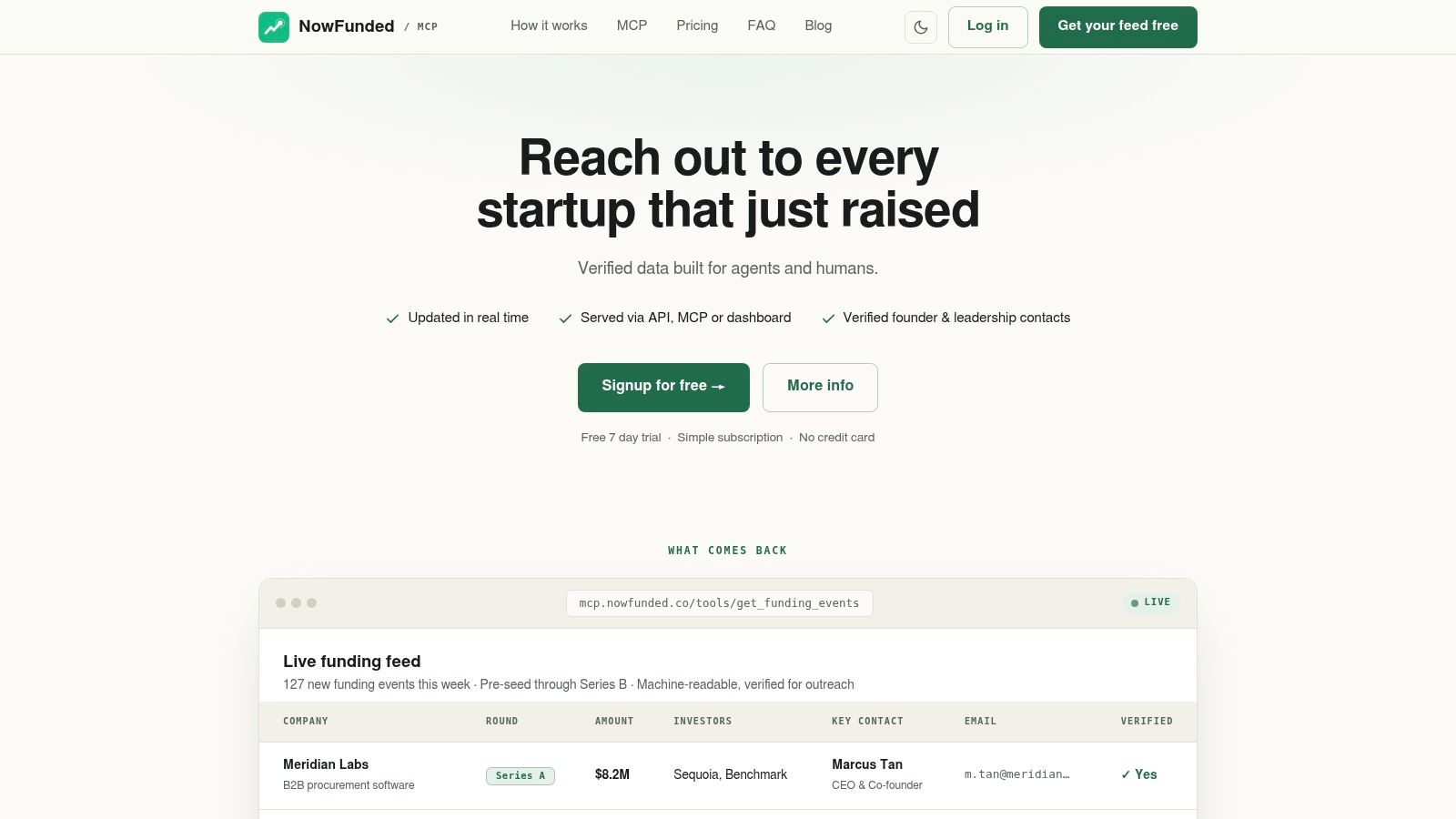
NowFunded solves the first problem in startup outbound: knowing which companies have just created a reason to buy, hire, partner, or respond. It provides a live, verified feed of funding events from pre-seed through Series B, with structured fields for the company, round, amount, lead investors, headquarters, headcount, industry, website, LinkedIn profile, and related context. Confirmed rounds enter the feed within minutes after verification, so teams aren't dependent on stale lists or scraper maintenance.
The product is especially strong when an outbound workflow needs machine-readable data. NowFunded supports MCP, REST API, webhooks, CSV export, and a web dashboard, with typed JSON schemas that let AI agents and internal systems process records deterministically. Webhook delivery also means a team can receive a new event through an HTTP POST rather than building polling loops.
Practical rule: Use a funding event to decide which account deserves attention, not as permission to send an irrelevant message.
Why it fits early-stage startup outreach
NowFunded tracks 100+ new startups weekly and maintains a historic database of 10,000+ records for lookbacks and trend analysis, as described by NowFunded's product overview. Funding-event queries are free, with no subscription or minimum spend. Contact enrichment is usage-based, and charges apply only after successful verification, at $0.10 per email and $0.25 per phone.
That model makes the tool attractive when timing matters more than broad database access. A sales team can receive a newly funded company, filter by geography or industry, request founder or leadership contacts, and pass verified records into its engagement system. Recruiters can use the same trigger to identify companies likely to expand hiring, while market-intelligence teams can study investors and funding patterns.
Pros
- Fresh funding signals: Confirmed rounds arrive minutes after verification.
- Agent-ready infrastructure: MCP, REST, webhooks, CSV, and typed JSON support automation.
- Verified contact enrichment: Email and phone pulls are billed only when verification succeeds.
- Flexible buying model: Funding data is free to query, with no subscription or minimum spend.
Cons
- Early-stage focus: It isn't designed for late-stage or public-market funding coverage.
- Usage-based contact cost: High-volume phone enrichment can become expensive because phone verification costs more than email verification.
For teams targeting recently funded startups, NowFunded isn't a replacement for every prospecting platform. It's the trigger and structured contact layer that gives databases, enrichment tools, and sequencers a better account list to work from.
2. LinkedIn Sales Navigator
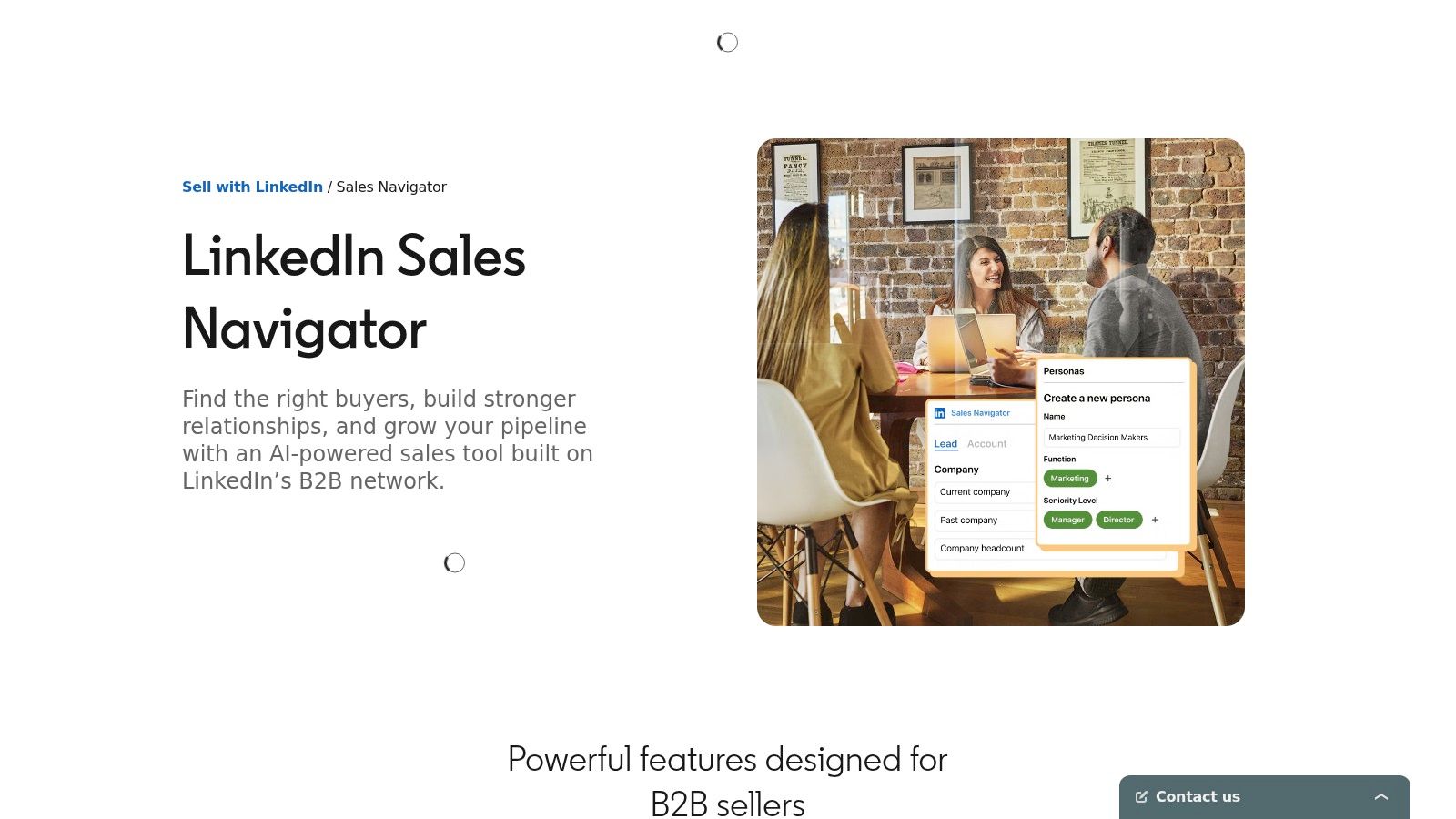
LinkedIn Sales Navigator is the strongest option when prospecting starts with people, relationships, and account changes inside LinkedIn. Its advanced lead and account filters help teams narrow searches by role, company, geography, and other professional attributes. Saved searches and alerts turn the platform into an ongoing monitoring layer rather than a one-time directory.
The key advantage is context. A job change, company update, shared connection, or buyer activity signal can give a rep a more relevant opening than a generic cold list. Teams can save accounts and leads, map lists into CRM workflows, and use InMail when LinkedIn is the chosen channel. The platform's official Sales Navigator page explains its position as LinkedIn's native prospecting product.
That strength also defines its boundary. Sales Navigator doesn't provide verified work emails or phone numbers, and InMail isn't equivalent to permission-based email delivery. A team that wants email or calling must pair it with enrichment and verification tools.
Best fit and trade-offs
Sales Navigator works well for account-based selling, relationship-led outreach, and research-heavy motions. It's less suitable as the only layer in a multichannel outbound stack, because contact identity and deliverability remain separate problems. Seat-based pricing can also become difficult to manage as more reps need access.
Pros
- Professional graph coverage: Useful for finding named people and understanding their role context.
- Timely relationship signals: Job changes and network connections can improve outreach timing.
- Research workflow: Saved lists, alerts, and account mapping support continuous prospect monitoring.
Cons
- Channel limitation: InMail doesn't replace verified email or phone outreach.
- Additional tooling: Email discovery, verification, and sequencing usually require separate products.
- Seat economics: Costs can rise as the prospecting team expands.
A practical stack might use Sales Navigator to identify the right founder or executive, NowFunded to surface the funding trigger, Hunter to verify the email, and Apollo or another engagement platform to sequence the message. Teams can find further workflow guidance in the NowFunded blog.
3. Apollo.io
Apollo.io is built for teams that want contact data and engagement in one workspace. Its database, Chrome extension, enrichment features, email sequencing, dialer, website visitor identification, intent capabilities, and API access let a lean sales team move from list building to outreach without exporting records between multiple systems.
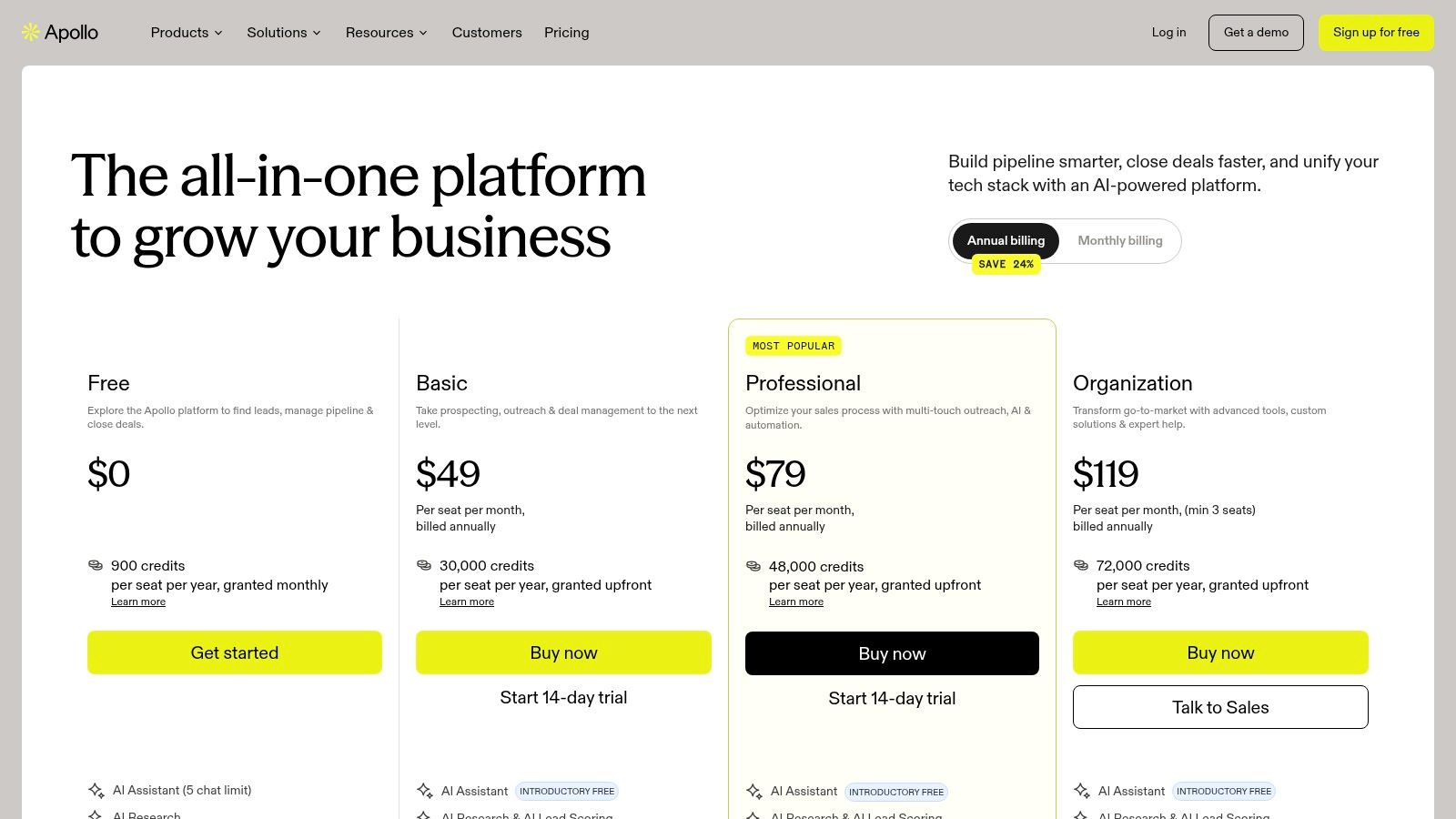
That consolidation is Apollo's main practical advantage. A small team can search for a role, save records, build a sequence, and monitor activity in one product. The Apollo pricing page provides the current plan structure, while the product's documentation and developer resources support teams that need API access.
The trade-off is that “all-in-one” doesn't mean every workflow is equally deep. Credit and export rules need close attention. A team may have access to a record but face limits around exporting, enrichment, dialing, or sequencing depending on its plan. Data quality can also vary by geography and job role, with phone accuracy requiring particular scrutiny.
Where Apollo belongs
Apollo is a strong fit when implementation speed matters more than building a highly composable architecture. It can replace several early-stage tools, but it may be less attractive to RevOps teams that want to select separate best-of-breed providers for each data field.
Pros
- Broad functionality: Database, enrichment, sequences, dialer, and website visitor workflows sit together.
- Fast deployment: Lean teams can start without designing a large integration layer.
- Developer access: API documentation supports custom workflows where the selected plan permits it.
Cons
- Credit complexity: Export and usage limits can affect the actual cost of each usable contact.
- Variable coverage: Region and role influence the usefulness of returned data.
- Verification requirement: Records should be checked before high-volume sending.
Apollo works well downstream from a strong trigger. For example, NowFunded can identify a newly funded startup, Apollo can help locate relevant commercial or technical roles, and a dedicated verifier can reduce the risk of sending against unconfirmed addresses.
4. Clay
Clay is for teams that see prospecting as a workflow design problem, not a database search. Its composable approach can waterfall across 100+ data sources, combine enrichment providers, run custom scrapes, and apply AI formulas to decide what happens to each row. That makes it a natural fit for RevOps teams, growth operators, and developers building agent-assisted research systems.
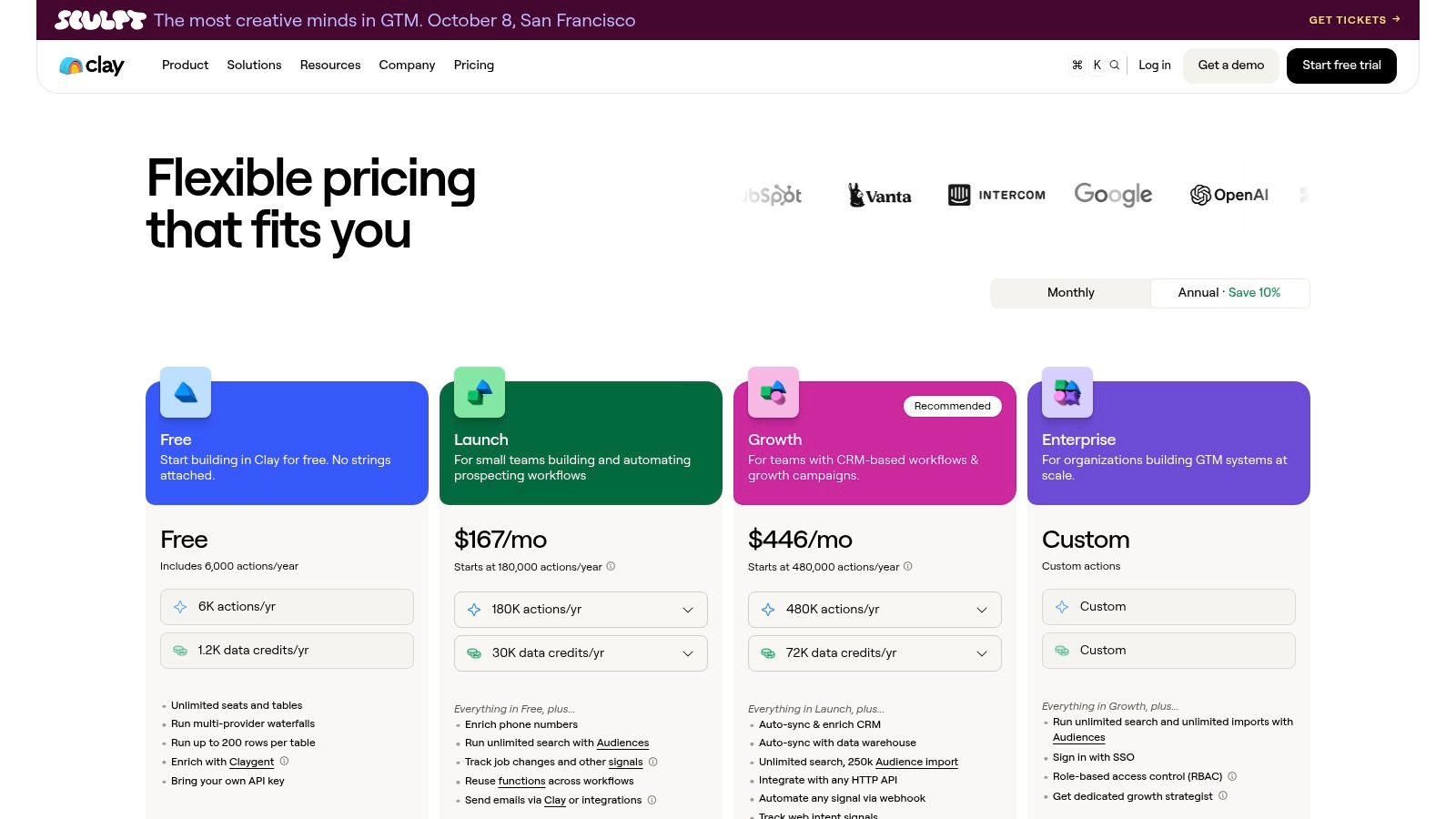
Clay's value appears when one provider leaves gaps. A workflow can try one source for company data, another for contact details, and another for social or website research, then apply rules before sending a record to outreach. The Clay pricing page also makes the relationship between plans, credits, and AI model usage important to evaluate.
The flexibility creates implementation work. Clay isn't as simple as opening a database and exporting a list. Someone must define the waterfall order, write the filtering logic, manage failed enrichments, and control the cost of external data and AI actions.
A powerful layer, not a shortcut
Clay works best when a team has a clear schema and knows which fields matter. It can turn a funding signal from NowFunded into a richer account brief, identify matching decision-makers, inspect public company information, and route only qualified records into a sequencer.
Pros
- Provider combination: Waterfall enrichment can improve coverage when one source lacks a field.
- Automation depth: AI formulas support custom list logic and repeatable research.
- Agent compatibility: The workflow model suits technical teams building automated prospecting pipelines.
Cons
- Steep learning curve: Configuration takes more skill than a standard contact database.
- Variable total cost: External data and AI usage affect spend beyond the base plan.
- Operational dependency: The workflow needs maintenance when providers, fields, or rules change.
Clay is often the right answer when a team's broken stage is enrichment orchestration. It's probably the wrong first purchase if the immediate problem is only finding a small number of verified founder emails.
5. ZoomInfo Sales
ZoomInfo Sales, also known as SalesOS, targets organizations that need enterprise-grade company and contact intelligence. Its platform combines a large B2B database, company profiles, direct dials, organizational charts, intent signals, integrations, and additional go-to-market modules for sales, marketing, operations, talent, and Copilot workflows. The ZoomInfo platform is most relevant to larger sales organizations with complex governance and integration requirements.
Its clearest advantage is depth in North American B2B coverage. A team selling into established U.S. companies may value organizational structure, direct-dial access, and intent signals more than a lightweight lookup tool. Mature workflows and integrations can also matter when many reps, managers, and systems depend on consistent account data.
The commercial model is less accessible. Pricing is sales-led, public pricing isn't provided, and add-on modules can increase total cost of ownership. That makes evaluation more involved than a self-serve product trial.
When enterprise depth justifies complexity
ZoomInfo makes sense when a sales operation needs several connected capabilities from one vendor and has the resources to govern them. It may be excessive for a small team, an early-stage startup motion, or a company selling across markets where U.S. coverage isn't the main priority.
Pros
- North American depth: Strong fit for U.S.-focused account and contact research.
- Organizational context: Org charts and company profiles support account-based planning.
- Enterprise operations: Mature integrations and governance suit larger teams.
- Module breadth: Sales, Marketing, Operations, Talent, and Copilot options can sit within one vendor relationship.
Cons
- Opaque buying process: Teams need a detailed proposal before they can assess the actual bill.
- Potentially high total cost: Add-ons and modules may materially change the purchase.
- Narrower fit: Smaller teams and non-U.S.-focused markets may not benefit enough from the platform's breadth.
Use a controlled account sample during evaluation. Ask for the fields, modules, seats, integrations, renewal terms, and export rules that your workflow requires, rather than treating database scale as proof of suitability.
6. Cognism
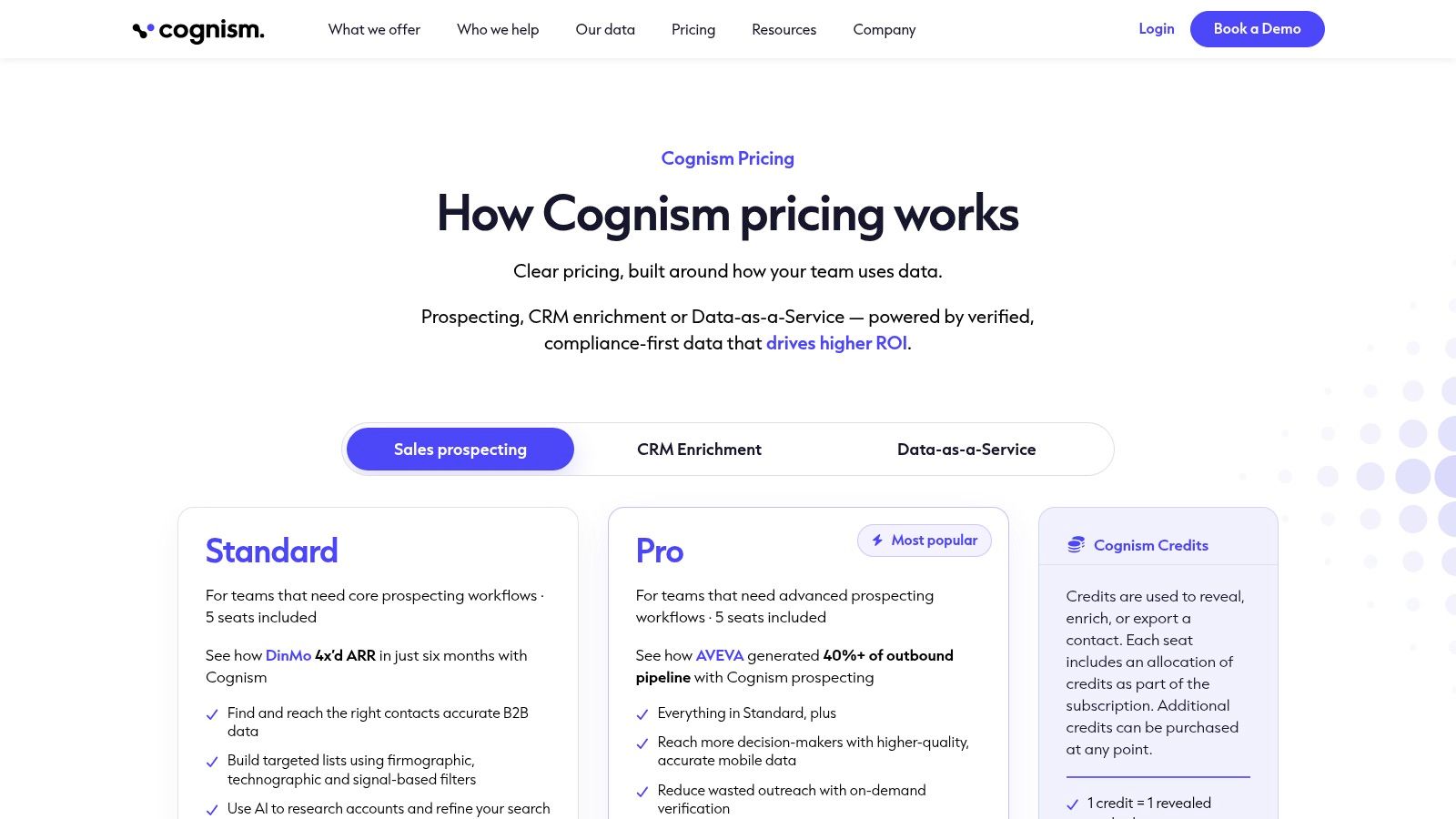
Cognism is designed for teams that prioritize EMEA data quality, mobile accuracy, and compliance posture. Its platform includes a global contact database, phone-verified mobile numbers, email data, Salesforce and HubSpot integrations, a Chrome extension, and workflows aimed at teams selling into Europe. The Cognism pricing page uses a sales-led model rather than a simple public price list.
For calling-led teams in the UK, DACH, and Nordic markets, the focus on phone verification can be more valuable than a broader but less dependable contact inventory. Compliance considerations also belong near the start of the buying process, particularly when teams need to document how data enters their outbound workflow.
Cognism isn't a universal answer for every geography or channel. Its annual, quote-based purchasing model can slow evaluation, and the platform may be costly for mid-sized teams that need only occasional enrichment. Teams should also distinguish between the core platform, seats, verified mobile access, and any additional data or intent services.
Strong for European calling motions
Cognism fits best when a team has a defined EMEA market, a calling motion, and a need for formal vendor review. It's less compelling when the team mainly sends email, targets early-stage startups globally, or wants usage-based access without an annual commitment.
Pros
- EMEA orientation: Useful for European market coverage and regional workflows.
- Phone verification: A strong match for calling-led prospecting.
- Compliance focus: Helps teams examine data governance alongside usability.
- CRM connectivity: Salesforce and HubSpot integrations support operational handoff.
Cons
- Quote-only purchasing: Teams can't assess the full commercial fit from a public rate card.
- Annual commitment: Procurement and evaluation can take longer.
- Implementation cost: Larger platforms require more process alignment than a lookup extension.
Cognism can complement NowFunded rather than replace it. NowFunded identifies the newly funded startup and funding context, while Cognism can support deeper EMEA contact research when the account matches the team's target market.
7. Lusha
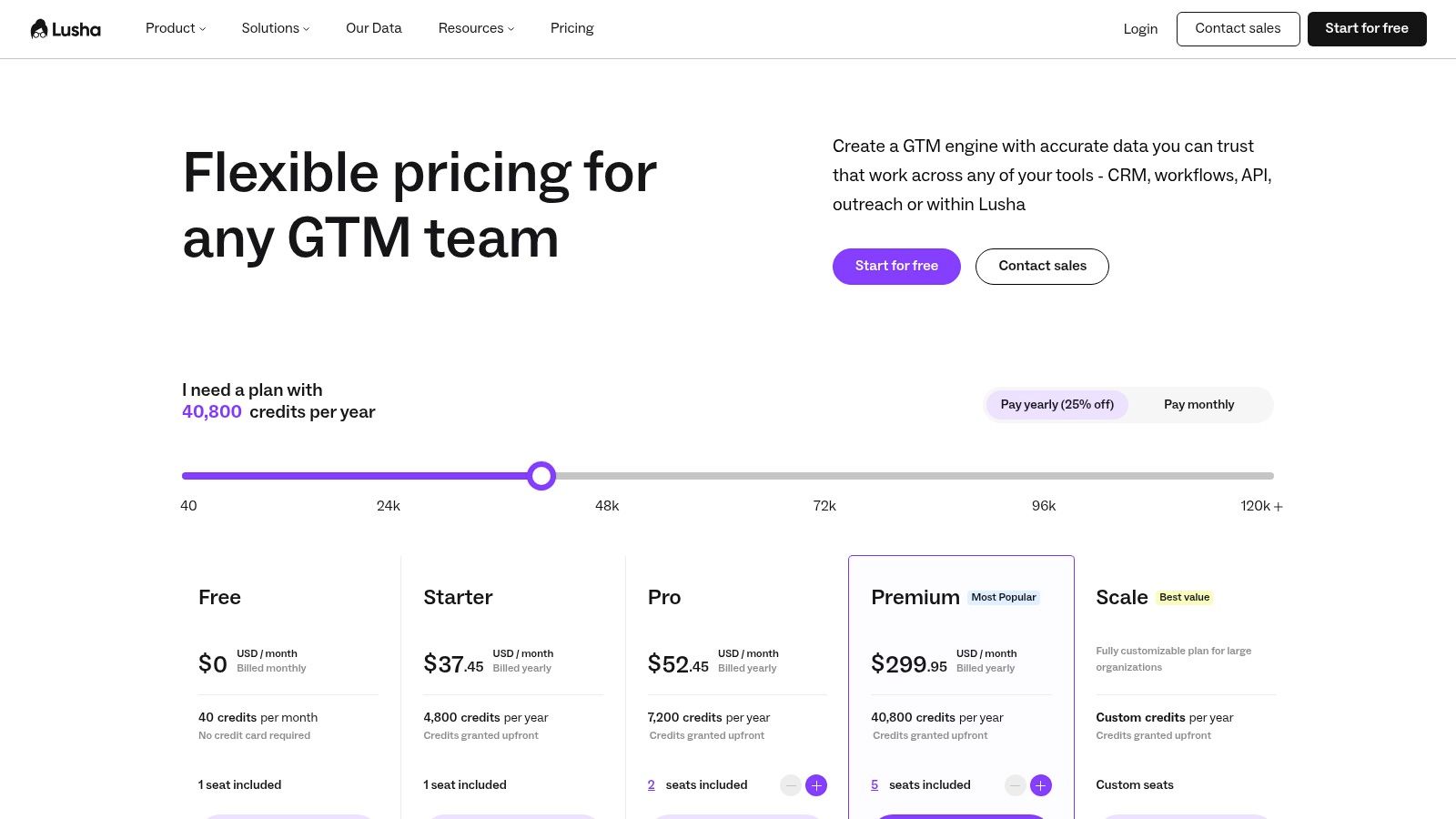
Lusha is the lightweight choice for quick contact lookup and enrichment. Its web app and Chrome extension let an SDR find business emails and direct dials while researching a person or company. Self-serve plans, monthly or annual billing, a credit slider, team management, and CRM integrations make the buying process easier for small teams than an enterprise sales cycle.
The product's simplicity is its point. A rep doesn't need to design an enrichment waterfall or administer a large intelligence platform. They can identify a prospect, retrieve available contact details, and move the record into an existing workflow. The Lusha pricing page provides the current purchasing context.
Lusha should be evaluated as a data layer, not a complete revenue operating system. Phone data and advanced account intelligence may lag enterprise tools, and credit or rollover rules can change how much value a team gets from the plan.
The right scale for fast lookups
Lusha is a sensible fit for SMBs, individual SDRs, and teams that already have a CRM or sequencer. It's less suitable for large GTM organizations that need advanced intent, deep org charts, extensive governance, or complex enrichment logic.
Pros
- Low administrative overhead: Self-serve access makes testing straightforward.
- Fast workflow: The extension supports research without constant tab switching.
- Simple credit model: Teams can connect usage to lookup activity more easily than with complex enterprise contracts.
- Useful integrations: Records can move into existing CRM processes.
Cons
- Limited enterprise depth: Advanced features and coverage may not match larger data providers.
- Credit rules: Rollover and field-level consumption affect perceived value.
- Phone limitations: Calling-heavy teams should test accuracy against representative accounts.
Lusha can sit after a company signal such as a funding round or hiring event. That sequence prevents the team from spending credits on broad, untimed searches and makes the lookup more targeted.
8. Crunchbase Pro
Crunchbase Pro is a company-first discovery and market-mapping tool. Its funding-round, investor, firmographic, and news filters help researchers identify accounts, understand backers, build target lists, and receive alerts when tracked companies change. Its AI assistant can speed up research, but the product's central value remains account discovery rather than contact verification.
That distinction makes Crunchbase Pro useful at the top of an outbound workflow. A researcher can filter companies by funding activity, industry, location, or investor relationship, then send the resulting account set to a people-data or enrichment tool. The Crunchbase Pro product page describes the company-focused search and alert model.
The limitation is equally clear: native contact information is limited compared with dedicated contact databases. Funding and event freshness can also vary by source, so teams should confirm the timing and relevance of a record before treating it as an immediate trigger.
Strong for account discovery
Crunchbase Pro is a good fit for TAM building, investor mapping, and startup research. It complements NowFunded when a team wants broader company discovery or market context, while NowFunded is more purpose-built for a live, verified early-stage funding feed and structured contact enrichment.
Pros
- Company discovery: Excellent for mapping markets and identifying relevant accounts.
- Funding context: Investor and round filters help explain why an account may matter.
- Alerts: Saved searches support ongoing monitoring.
- Easy complement: The output can feed a separate contact and engagement workflow.
Cons
- Limited contact layer: It isn't a replacement for email or phone enrichment.
- Variable freshness: Teams should validate event timing before acting.
- Additional handoffs: Research must move into another system before outreach can begin.
The practical question is not whether Crunchbase Pro or a funding feed is “better.” It's whether the team needs broad company intelligence, immediate event delivery, or both.
9. Seamless.AI
Seamless.AI focuses on contact discovery through email and phone lookup, with a Chrome extension, team features, integrations, basic sequencing, and credit-based “Find” workflows. It's often used as a supplemental source when a primary database doesn't return enough phone coverage for a target list. The Seamless.AI website is the right place to verify current plans and usage terms because precise paid pricing isn't clearly published.
The product is easy to test. Free trial credits let a team run searches against real target accounts before committing, and the browser extension supports research while a rep browses LinkedIn or company websites. That speed can be useful when a campaign has a clear account list but missing contact fields.
Buyers should be careful with credit rules, throttling caps, and phone coverage. A record that can be discovered isn't automatically a record that should enter a sequence. Teams need to verify returned details, understand what consumes credits, and test the handoff into the CRM or engagement platform.
Best as a supplemental source
Seamless.AI makes more sense as a second source than as the foundation of a carefully governed data stack. It can help fill gaps after a funding signal, company search, or LinkedIn research step, but teams shouldn't assume that a broad discovery workflow removes the need for verification.
Pros
- Quick setup: Teams can evaluate the extension and search process quickly.
- Phone supplementation: Useful when a primary provider has incomplete direct-dial coverage.
- Workflow access: Integrations and exports support downstream outreach.
- Trial availability: Free credits allow practical testing before a larger commitment.
Cons
- Unclear paid pricing: Sales-led purchasing makes total cost harder to predict.
- Credit complexity: Caps and throttling can disrupt high-volume workflows.
- Verification burden: Buyers should validate phone and email accuracy before sending.
The strongest architecture pairs a precise account signal with a supplemental contact source. That approach is safer than asking Seamless.AI to discover, qualify, verify, and prioritize every prospect by itself.
10. Hunter
Hunter is a specialist for the email discovery and verification stage. It supports domain-based and person-based email finding, bulk enrichment, verification indicators, CSV workflows, and an API. Its clear public pricing and unlimited users on paid plans make it easier to introduce into an existing stack than a platform that requires an enterprise contract. Details are available on the Hunter pricing page.
Hunter's narrow focus is an advantage. Teams don't pay for a full dialer, social graph, or account-intelligence suite when the immediate problem is whether a work email exists and can be delivered. That makes it a useful companion to company signals from NowFunded or Crunchbase Pro, and to people research from LinkedIn Sales Navigator.
The product isn't complete on its own. Hunter doesn't provide phone numbers, and contact coverage depends on a company's web footprint. Firmographic context is also limited compared with full sales-intelligence platforms, so users need another source to decide which companies deserve attention.
A clean verification layer
Hunter fits teams that already know which accounts and roles they want to reach. The workflow is straightforward: identify the company, find the relevant person, verify the email, then pass approved records to the engagement system.
Pros
- Email specialization: Focused discovery and verification reduce unnecessary platform complexity.
- Bulk workflows: CSV and API access support repeatable list operations.
- Transparent buying: Public pricing simplifies early evaluation.
- Useful interoperability: It pairs naturally with company and funding-signal tools.
Cons
- No phone data: Calling teams need another provider.
- Limited firmographics: It isn't a substitute for account intelligence.
- Web-footprint dependency: Some companies and roles will have little discoverable information.
Hunter is strongest after targeting has already been narrowed. Using it to validate a broad, untargeted list wastes the very efficiency that a specialist verifier provides.
Top 10 Prospecting Tools, Feature Comparison
Product Core features Contact quality & verification Integration & delivery Best for / Target audience Pricing model NowFunded Real-time funding feed (pre-seed→Series B), typed JSON schemas, 10k+ history Deliverable emails & phones verified before charge MCP + REST API, webhooks (push), CSV export SDRs, recruiters, market-intel, AI-agent developers Usage-based; funding queries free; $0.10/email, $0.25/phone; no subscription LinkedIn Sales Navigator Advanced lead/account search, alerts, InMail, job signals Profile-based signals; no verified work emails/phones CRM syncs, saved searches, platform tools LinkedIn-centric prospecting & recruiting Seat-based subscription (public tiers) Apollo.io Contact DB + sequencing, dialer, enrichment, website intent Broad contact coverage; phone accuracy varies by region API, Chrome extension, CRM integrations Lean sales teams wanting outreach + data in one tool Free starter; credit/export limits; paid plans Clay Waterfall enrichment across 100+ sources, AI formulas, automations High match rates when combining sources (requires setup) Many data sources, custom scrapes, automation pipelines Advanced RevOps, AI-agent and automation teams Tiered plans + external data / AI usage costs ZoomInfo Sales (SalesOS) Large B2B data cloud, org charts, intent signals, GTM modules Deep U.S. coverage with device‑verified phone data Enterprise integrations and multiple GTM modules Large US-focused sales & enterprise GTM teams Sales-led enterprise pricing (custom contracts) Cognism EU-first contact DB, GDPR focus, mobile-verified numbers Strong EMEA mobile accuracy and compliance posture CRM integrations, Chrome extension Teams targeting EMEA with calling-led motions Sales-led, annual contracts Lusha Chrome extension, quick enrichment, list building UI Fast emails & dials for quick lookups; simpler coverage CRM integrations, extension, CSV export SMB SDRs and small teams needing fast lookups Credit-based self-serve subscription Crunchbase Pro Firmographics, funding rounds, investor filters, alerts Company/funding signals strong; limited native contact details Saved searches, alerts, company discovery tools TAM building, investor/backer mapping, market research Subscription-based plans (public) Seamless.AI Email & phone discovery, Chrome extension, export workflows Useful supplemental phone source; quality varies by region Chrome extension, exports, basic sequencing Teams needing extra phone coverage or supplementing other sources Credit-based model; pricing often sales-led Hunter Domain/person email discovery, bulk verification, API & CSV Strong email verification; no phone numbers provided API, CSV, Chrome extension Email verification and bulk enrichment at scale Clear public pricing; credit/usage plansBuild Around the Signal You Can Act On
The right prospecting stack starts with a broken workflow stage, not a vendor leaderboard. If the team doesn't know which accounts deserve attention, improve signal discovery first. If it has target accounts but lacks context, add company research. If the message reaches the wrong person or bounces, fix enrichment and verification before buying more sequencing capacity.
A practical outbound architecture usually has four layers:
- Signal source: Identify a timely reason to prioritize an account, such as a verified funding event, a job change, website activity, or another relevant business trigger.
- Company and people research: Confirm the account fits the ICP, then identify the roles that can evaluate, buy, hire, or influence the next step.
- Enrichment and verification: Complete missing fields and validate email or phone data before sending.
- Engagement and measurement: Run the approved outreach, stop sequences when people respond, and connect activity to qualified outcomes in the CRM.
NowFunded is particularly useful in the first two layers for early-stage startup outreach. Its funding feed identifies companies from pre-seed through Series B, while structured fields and verified founder or leadership contacts help turn an event into an actionable record. Apollo can combine data and engagement, Clay can orchestrate multi-provider enrichment, Hunter can verify emails, and LinkedIn Sales Navigator can supply professional and relationship context. None of those tools needs to replace the others if each one has a defined job.
The buying model should match the workflow. Usage-based pricing can be efficient when contact pulls are selective, while seat-based plans suit teams that need continuous access. Quote-based enterprise contracts may make sense when governance, integrations, and broad coverage justify procurement effort. Credit systems require a different calculation, because the apparent subscription price doesn't tell you how many usable records the team can process.
A lower-priced tool isn't cheaper if reps spend more time correcting records, exporting files, and checking failed contacts.
Data coverage also depends on geography and channel. ZoomInfo may suit a large U.S.-focused organization, Cognism may be better aligned with EMEA calling, Sales Navigator is strongest for LinkedIn research, and Hunter is deliberately narrower because it concentrates on email. Startup-focused teams may prefer a live funding signal over a huge static database when timing determines whether the outreach feels relevant.
AI adds another control problem. Recent coverage says more than half of teams are already using AI for personalized outbound emails, while the next wave involves predictive and generative systems that recommend who to contact, when to reach out, and what to say, according to LinkedIn's prospecting trend coverage. The useful question isn't whether AI can draft a message. It's whether the team can validate the targeting, data quality, consent basis, timing, and response outcome behind that message.
Adoption has moved quickly. 68% of B2B sales professionals used prospecting software daily in 2025, compared with 45% in 2020, and 74% said these tools produce higher lead quality than manual methods, according to Gitnux's industry summary. That evidence supports software-assisted workflows, but it doesn't prove that one platform is right for every team.
Choose the smallest connected stack that completes the workflow. For early-stage startup outreach, that may mean NowFunded for the funding trigger and verified contact layer, LinkedIn Sales Navigator for role context, Hunter for email validation, and an engagement tool for sequencing. A larger organization may consolidate more functions inside ZoomInfo, Apollo, or Cognism. The correct choice depends on data freshness, geography, channel, technical capacity, buying model, and the stage where your team loses the most time.
If your team targets newly funded startups, start with the trigger instead of another generic list. NowFunded provides a live, verified funding feed from pre-seed through Series B, structured for AI agents and human operators, plus on-demand verified founder and leadership contacts through MCP, REST API, webhooks, CSV, or the dashboard. Visit NowFunded to build a timely outbound workflow around funding events your team can act on.