10 AI Agent Tools for Building Smarter Workflows
The best ai agent tools are not the ones with the longest feature list. They're the ones that fit the actual path your data has to travel, from input to decision to action, without forcing your team to bolt together brittle glue later. That matters more now because the market is scaling fast, from USD 5.26 billion in 2024 to USD 7.84 billion in 2025, with a projection of USD 52.62 billion by 2030 (MarketsandMarkets), but production adoption is still held back by governance, integration, and reliability gaps (Dresner Advisory Services report).
So the right comparison starts with workflow fit, not hype. Does the agent need to orchestrate steps, retrieve documents, trigger SaaS actions, enforce enterprise controls, or consume fresh external signals? The tools below answer different versions of that question, and the useful distinction is how they connect through MCP, REST, or webhooks, whether they emit typed or schema-based outputs, how they deploy, and where the compromises show up in observability, cost, and reliability. For teams that need verified startup-funding context as a machine-ready input, NowFunded is a practical example of a data layer, not a generic framework. It gives agents fresh funding records they can trust, instead of asking them to infer that data from messy scraping or stale lists.
Table of Contents
- 1. NowFunded
- 2. LangGraph
- 3. Microsoft Agent Framework
- 4. OpenAI Responses API and Agents SDK
- 5. CrewAI
- 6. LlamaIndex
- 7. Zapier Agents
- 8. Retool Agents
- 9. PydanticAI
- 10. Agno
- Top 10 AI Agent Tools, Features Comparison
- Match the Tool to the Data Path
1. NowFunded
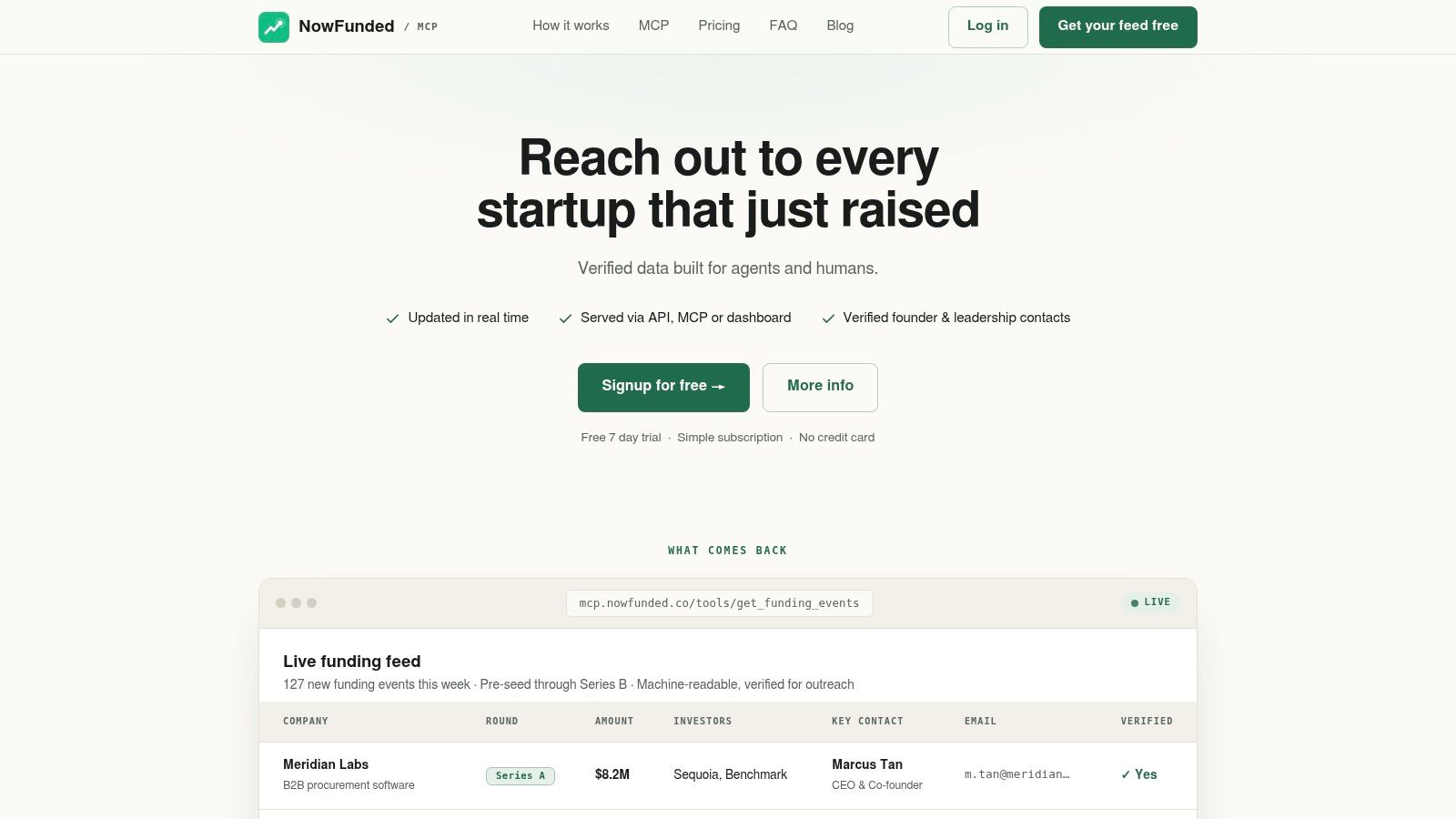
NowFunded addresses a different layer of the agent stack than most frameworks. It does not decide actions for the model. It supplies a clean, verified data path for newly funded startups, with structured records that already match the fields outreach, recruiting, and market-intel workflows need. The practical gain is simple, the data enters the system in a machine-friendly form, so agents spend less time parsing pages or stitching together partial records.
Why the data path matters
The platform exposes funding events through a native MCP endpoint, REST API, webhooks, CSV export, and a dashboard, which makes it usable in both low-code and code-first stacks. That matters because repeated polling can create noise and waste, while webhook delivery pushes verified rounds as they appear, which fits first-response workflows better. NowFunded also publishes typed JSON schemas, so teams can build deterministic extraction and routing around fields like company, round, amount, investors, HQ, headcount, industry, website, and LinkedIn without writing a custom parser.
Practical rule: if an agent's first job is to know a company just raised money, start with a structured feed before you add reasoning layers.
The contact enrichment layer changes the trade-off again. NowFunded provides 2 to 5 verified contacts per company on demand, including founders and relevant leaders, and charges only when verification succeeds. That is a better implementation choice than pushing unverified outreach data into an agent loop, especially when bounce risk and wasted actions matter more than raw volume. Funding-event queries are free, while contacts are usage-based at the stated rates, so the cost model stays tied to actual intent.
Best fit and compromise
This is the strongest option for sales teams, recruiters, market-intel analysts, and agent builders who need fresh startup-funding records with low maintenance. The compromise is scope, because it focuses on pre-seed through Series B, so it is not the right source if the workflow depends on late-stage enterprise prospecting. The upside is a focused feed, structured outputs, and a predictable operational path.
A strong use case is an outbound agent that waits for a webhook, enriches the company, maps the round to a playbook, and then writes the task into a CRM or sequencing tool. The mix of MCP, REST, and webhook delivery matters more here than a broader but less deterministic platform. See the product details on NowFunded.
2. LangGraph
LangGraph is the safest default when an agent needs to remember state, retry steps, and keep control flow explicit. Its graph-based runtime is built for systems where you want the model to choose actions inside a governed structure, not wander through a loose prompt loop. That design fits production work better than quick demos, because complex workflows usually fail at the seams between tool calls, not inside the model itself.
Reliability before novelty
LangGraph's main strength is that it lets teams model the agent as a state machine with checkpoints rather than a one-shot prompt. That matters for multi-step work such as research triage, support routing, or internal operations, where you need to inspect how the agent reached a decision and resume from a known state after a failure. The managed LangGraph Platform helps with deployment, while LangSmith adds tracing and evals for teams that need observability in the same stack.
The implementation compromise is the learning curve. Graph and state abstractions make the system more reliable, but they also make it more opinionated than lightweight wrappers. If your team is expecting a quick chatbot scaffold, LangGraph can feel heavier than necessary. If your team needs retries, guardrails, and long-running orchestration, that weight is usually the point.
A workflow that can't be inspected is hard to trust once it touches real data or real users.
Where it fits best
LangGraph is strongest when you already know the control flow is complex. It pairs well with retrieval, vector stores, and tool ecosystems, but value comes from the discipline of making state visible. That makes it especially useful for teams moving from prototype to production, because the same abstractions can carry from local testing to managed deployment.
The trade-off is that LangGraph asks you to invest in architecture early. That's not a drawback if your use case includes approvals, long-lived runs, or multi-agent handoffs. It is a drawback if you just need a thin layer on top of a model API. In other words, it rewards teams that care about production behavior before they care about novelty. Visit LangGraph if your workflow needs that level of control.
3. Microsoft Agent Framework
Microsoft Agent Framework is the most natural choice for teams that already live inside the Microsoft ecosystem and want agent interoperability to be a first-class concern. Its value is less about flashy agent demos and more about shipping multi-agent systems with MCP and Agent-to-Agent support baked into the architecture. That makes it a practical fit for enterprise organizations that care about governance, compatibility, and long-term support.
Interoperability is the selling point
The framework's appeal comes from how it treats agents as components in a broader enterprise system. Python and .NET support make it accessible to teams with mixed stacks, while the A2A protocol gives organizations a path for cross-agent communication and hosting. MCP support matters because it lets the agent access tools through a recognized interface instead of ad hoc connectors, which reduces the amount of custom glue code that would otherwise accumulate in production.
That interoperability comes with complexity. A2A, channels, and production guidance introduce more concepts than many teams need on day one. If your organization wants a neutral, minimal framework, the Microsoft orientation may feel limiting. If your deployment already depends on Azure, Microsoft documentation, or adjacent governance services, that same orientation becomes a feature instead of a constraint.
Enterprise fit and compromise
This framework is best for organizations that need an enterprise story around permissions, orchestration, and platform alignment. It's especially useful when the agent's job is to move data between systems that already have Microsoft identity and cloud dependencies. The compromise is that the path feels more native inside Microsoft environments than outside them, so multi-cloud teams may prefer something less opinionated.
The most important judgment here is simple. Microsoft Agent Framework is not trying to be the lightest way to get started. It's trying to be the most compatible way to operationalize agents at scale inside a Microsoft-centered enterprise. If that's your environment, the trade-off is rational. Read the official guidance at Microsoft Agent Framework.
4. OpenAI Responses API and Agents SDK
OpenAI's agent stack is the most straightforward choice when you want first-party model access and tool calling in one place. The draw is convenience, not abstraction for its own sake. If your team wants to mix web search, file search, optional computer use, and stateful conversations without stitching together separate vendor layers, this is the cleanest path.
One API, multiple capabilities
The Responses API and Agents SDK reduce friction by keeping the model and the tool interface close together. That lowers the overhead for teams that want to move fast, especially when they're already standardizing on OpenAI models. The migration path from the Assistants API also matters because it gives existing teams a route forward without rebuilding everything from scratch.
The downside is control. The feature set is broad enough that teams can overbuild before they've defined the workflow clearly. Costs also depend on model choice and usage patterns, so you need to watch consumption closely if the agent runs frequently or loops over long conversations. That makes observability and spend controls part of the implementation, not an afterthought.
Implementation trade-off: the more you lean on built-in capabilities, the faster you ship, but the more you need to monitor model selection and usage drift.
Best use case and limitation
This stack works best when the agent is close to the model and the workflow does not require a lot of custom runtime plumbing. It's a strong fit for teams that want to prototype and deploy with fewer moving parts, especially if they value broad ecosystem support and frequent platform updates. The limitation is that the abstraction can hide enough detail to make cost and behavior harder to reason about unless you instrument it carefully.
That doesn't make it weak. It makes it opinionated in a different direction than LangGraph or PydanticAI. OpenAI gives you a polished, integrated surface, while other frameworks give you more control over each step. If you want that integrated surface, start at OpenAI API.
5. CrewAI
CrewAI organizes agent work around collaboration between defined roles. That model is easy to explain and quick to prototype, which makes it useful for early multi-agent experiments. Teams can assign responsibilities, connect tasks, and test whether specialized agents divide work more effectively than one generalist agent.
A team model that reduces setup friction
The framework's main advantage is its clear workflow model. A crew receives inputs, routes them through role-specific tasks, and passes results between agents. This fits brainstorming pipelines, research workflows, and prototype systems where the team is still testing task boundaries.
Its data path is less specialized. CrewAI can coordinate information supplied by files, APIs, or application logic, while actions typically depend on configured tools and integrations. Teams considering MCP, REST endpoints, or webhooks need to define those interfaces and decide how each tool's response becomes context for the next task. The framework does not remove the need for schemas, validation, or error handling.
That distinction matters in production. Observability and operations often require additional tooling, and managed options provide less transparency than some enterprise-oriented platforms. Repeatability becomes harder when tasks have loose inputs, variable outputs, or unclear run boundaries.
Where it wins, and what it leaves open
CrewAI works well when product teams, analysts, and developers need a shared vocabulary for agent design. Roles and tasks make the workflow legible without requiring every participant to reason about low-level control flow. The approach also supports rapid iteration while the team is deciding which steps should be automated.
The compromise appears when the workflow needs durable execution and structured external data. Teams must supply reliable inputs, define output schemas, record tool calls, and establish retry or approval rules around the crew. For startup-funding workflows, that can mean pairing CrewAI with a dedicated startup funding data source rather than asking the orchestration layer to discover the signal itself. This separation keeps data collection, tool execution, and agent coordination easier to test, even though it adds integration work.
6. LlamaIndex
LlamaIndex belongs in the conversation when the bottleneck is not orchestration, but understanding documents. It is built for agents that need to ingest PDFs, policies, resumes, research notes, or long-form records and turn them into structured context. For knowledge-heavy workflows, that can matter more than having the flashiest agent loop.
Documents are the input, not the afterthought
The key advantage is that LlamaIndex treats retrieval, parsing, and extraction as core parts of the agent stack. LlamaParse gives teams a way to convert messy documents into usable structure, and schema-based extraction helps make outputs easier to validate. That is a strong fit for due diligence, recruiting, prospect research, and internal knowledge systems where the agent must interpret text before it can act.
The practical trade-off is that the best results usually come when you adopt more of the LlamaIndex parsing and retrieval stack. If you only want a generic agent wrapper, some of its value stays unused. If your workflow starts with documents, that deeper stack is exactly what you want, because it reduces downstream ambiguity and makes retrieval less fragile.
Useful heuristic: if the input is a PDF before it is a task, a data-centric framework usually beats a general agent loop.
Best use cases and limitations
This is the strongest option on the list for document-driven agents. It helps when the output must be grounded in specific source material, especially in workflows where a human reviewer will later inspect the reasoning trail. The limit is that enterprise features may require sales engagement, so teams should expect a more consultative path as requirements grow.
LlamaIndex pairs well with systems that already have a clear action layer. It handles the knowledge intake, then hands off to a separate orchestrator or SaaS automation tool. That separation is often healthier than trying to make one framework do everything. See the product at LlamaIndex.
7. Zapier Agents
Zapier Agents is the most direct route from agent intent to actual SaaS actions. Its value is simple, it sits on top of a large app ecosystem and lets the agent operate across tools like CRMs, inboxes, sheets, and Slack without a lot of custom integration work. For sales ops and recruiting ops, that lowers the time from idea to workflow materially.
Action first, plumbing second
This is the right tool when the agent needs to write records, send messages, or move data across familiar business apps. MCP support and the SDK for custom tools make it easier to extend beyond the default ecosystem, while sharing controls help teams distribute agents internally. That combination is especially useful when multiple departments need to use the same automation patterns without rebuilding them.
The downside is cost discipline. Usage is measured by tasks and agent activity, so poorly designed workflows can become inefficient fast. No-code convenience also has a ceiling, because very high-volume or highly customized automations can outgrow the constraints of the platform. In practice, that means Zapier is strongest when the execution path is clear and repetitive.
Where it belongs in the stack
Zapier Agents is best treated as an action layer, not a reasoning engine. It is effective when another system has already done the thinking and the agent needs to trigger work across SaaS tools. That makes it a strong match for lead routing, enrichment handoffs, outbound follow-up, and internal task creation.
The most common mistake is asking it to compensate for weak upstream data. If the input is incomplete, the automations will be too. That is why teams building startup workflows often combine action tools with structured feeds, rather than expecting the automation layer to discover everything on its own. Visit Zapier if your team wants the fastest path to app-level execution.
8. Retool Agents
Retool Agents is built for internal operations, where the agent needs to read, write, and explain what it's doing inside tools your team already controls. That makes it a strong fit for lead triage, candidate routing, research summaries, and other workflows where human oversight still matters. The biggest benefit is that the agent can live inside an internal app instead of existing as a separate, fragile workflow.
Internal control surfaces matter
Retool's value comes from the combination of data connectors, authentication, and human-in-the-loop UI patterns. That means teams can build an internal system where the agent proposes actions, a reviewer approves them, and the final write goes to the database or SaaS system under enterprise permissions. For operational teams, that is often safer than deploying an autonomous process directly into production.
The pricing trade-off is real. Retool bills by wall-clock runtime for agents, which gives you another meter to watch alongside model usage. That's not necessarily bad, but it does mean the economics of slow or overly chatty workflows can become visible quickly. Teams need to design for concise loops and tight guardrails, not endless back-and-forth.
Best fit
Retool is most compelling when the agent is part of an internal product or admin layer. It is less compelling for public-facing automation where external users expect a more polished, dedicated application experience. If your team needs a controlled environment with auditability and the ability to bring your own model keys, the trade-off is favorable.
This is one of the best options when governance has to be designed into the UI itself. That makes it easier for operations, compliance, and support teams to work from the same system instead of splitting work across spreadsheets and ad hoc chat threads. See Retool for the internal-app approach.
9. PydanticAI
PydanticAI suits developers who need typed interfaces and predictable outputs without adopting a heavyweight framework. Its central design choice is to treat schemas as a control surface for agent reliability. The data path is explicit: model responses are parsed into defined structures, validated in code, and passed to later tools or services only after they meet the expected shape.
Typed outputs reduce ambiguity
Schema validation is the main advantage. For structured extraction, tool calls, and machine-consumable workflows, the application can reject malformed output at the boundary rather than discovering the problem later in a pipeline. This makes failures easier to classify and gives developers a clear place to add retries, fallbacks, or human review.
MCP, REST, or webhook integrations still require deliberate implementation. PydanticAI can define the input and output contracts around those actions, but it does not remove the need to configure authentication, transport, tool registration, or error handling. Teams gain control over the data path, while accepting responsibility for assembling the surrounding integration layer.
Logfire adds tracing and cost visibility to the developer workflow. Observability can show the prompts, tool activity, and resulting output, helping engineers distinguish a model decision from a schema or integration failure. The trade-off is operational ownership: teams must choose and connect more infrastructure instead of receiving a large set of built-in components.
Best use case and compromise
PydanticAI is a strong fit for technical teams that prioritize control, typed contracts, and clear failure handling over a broad prebuilt ecosystem. It works well when outputs must enter databases, APIs, or downstream code with predictable structure. Teams that want ready-made orchestration, connectors, and deployment conventions may reach a working system faster with a heavier framework.
Its practical advantage is the boundary between data acquisition and reasoning. External feeds, internal services, and tool responses can be normalized before the agent acts on them, then validated again before another system receives the result. That approach requires more design work, but it reduces ambiguity at each handoff and keeps the runtime relatively light.
10. Agno
Agno is the most interesting option when you want one runtime to host different kinds of agents without forcing them into a single framework style. Its AgentOS approach lets teams expose agents through a shared API and even wrap agents from other frameworks behind the same runtime. That can simplify operations when a company has already accumulated multiple agent patterns.
A runtime for heterogeneous teams
The appeal is consolidation. If one team built a retrieval-heavy agent in one stack and another built a task-oriented agent elsewhere, Agno gives the organization a way to surface them through a unified interface. MCP server mode adds another integration path, so agents can be exposed as tools rather than trapped inside one application boundary.
The limitation is maturity. Younger ecosystems usually move faster, but they also tend to require more careful evaluation around scaling, documentation depth, and production hardening. Agno can be a smart choice for teams that are comfortable trading some ecosystem maturity for runtime flexibility. It is less ideal if you want the most established path available today.
Best fit and trade-off
Agno is strongest for teams trying to standardize the serving layer across different agent implementations. That makes it useful in platform engineering environments where consistency matters as much as individual project velocity. The trade-off is that you may still need extra tooling for large-scale operability, depending on your reliability requirements.
That makes Agno a sensible choice for infrastructure-minded teams, not a universal default. If your goal is to unify heterogeneous agents behind one production API, it offers a clean architectural story. Visit Agno if that runtime-centered approach matches your stack.
Top 10 AI Agent Tools, Features Comparison
Product Core offering Integration & delivery Data quality & verification Best for / Target audience Pricing & value NowFunded Real-time, verified feed of early-stage funding + verified founder/lead contacts Native MCP, REST API, webhooks, CSV export, web dashboard; push or poll modes Typed JSON schemas; contact deliverability verified; 10k+ historic records; 100+ new startups/week Sales/outbound, recruiters, market-intel, AI agents, indie builders Funding queries free; pay-per-contact ($0.10/email, $0.25/phone); no subscription minimum LangGraph (LangChain) Graph/state-based agent orchestration with checkpointing and tool calling Local, self-host, or managed LangGraph Platform; LangSmith tracing/evals Framework (not a data provider); strong observability and determinism Teams building reliable, multi-step agent systems OSS runtime free; managed Platform and LangSmith are paid Microsoft Agent Framework (MAF) Enterprise-grade multi-agent orchestration with A2A and MCP support SDKs for Python/.NET; MCP & A2A protocols; Azure integration Framework-level governance; not a data feed Enterprises standardizing on Azure needing governance at scale Open-source framework; hosting/service costs vary (Azure) OpenAI Responses API & Agents SDK Agent-oriented API with tool calling, web/file search, stateful conversations Unified API and Agents SDK; built-in tool integrations Not a dataset; provides model/tool outputs for agents Teams wanting first-party tool calling and OpenAI models Usage-based pricing by model; Business/scale tiers available CrewAI Open-source, role-based multi-agent framework for quick prototyping Python APIs; multi-provider model support and optional managed cloud Framework only (no built-in data feed) Fast prototyping of multi-agent crews and teams OSS core free; cloud/enterprise custom pricing LlamaIndex Data-centric agents: parsing, structured extraction, indexing, RAG LlamaParse, connectors, indexing pipelines for documents Optimized for document parsing/extraction (OCR/schema) Agents needing heavy document reasoning (due diligence, resumes) Generous free tier; enterprise features may require sales Zapier Agents Agents that act across 9,000+ SaaS apps (CRM, inbox, sheets, Slack) MCP support, SDK for custom tools, app connectors, admin controls Action-oriented integrations; not a structured funding dataset SDRs, recruiting ops, non‑engineering teams needing SaaS actions Tiered pricing; billed by task/agent activity Retool Agents Internal, data-connected agents embedded in Retool apps with UIs Built-in connectors, auth, BYO model keys, observability UIs Operates on your connected data sources Internal ops: lead triage, candidate routing, research UIs Agent runtime billed by wall-clock; AI calls use your model keys PydanticAI (+ Logfire) Type-safe agents with schema-validated outputs and observability MCP client support, multi-provider adapters, durable exec integrations Enforces typed, schema-validated outputs; pairs with Logfire for tracing Developers who want strong typing and traceability OSS core free; Logfire observability metered after free tier Agno (AgentOS + SDK) AgentOS runtime to host/unify heterogeneous agents behind one API MCP server mode; SDK/runtime open-source; pluggable LLM providers Framework/runtime focus; not a curated data provider Teams unifying agents from multiple frameworks into one runtime Open-source runtime; commercial hosting/support available separatelyMatch the Tool to the Data Path
The right selection process starts with one question, what kind of data path does the agent need? If the workflow is stateful and failure-prone, choose LangGraph. If the organization is centered on Microsoft tooling and enterprise integration, choose Microsoft Agent Framework. If you want first-party model access with built-in tools, choose OpenAI's Responses API and Agents SDK. If you're prototyping role-based collaboration, CrewAI is a natural fit.
For document-heavy work, LlamaIndex is the most obvious match because it treats retrieval and extraction as first-class inputs. For operational SaaS actions, Zapier Agents and Retool Agents are better choices than trying to force a general-purpose framework to act like an integration platform. If the team wants typed developer control and easy-to-verify outputs, PydanticAI is a strong option. If you need a common runtime across heterogeneous agents, Agno gives you that serving layer.
NowFunded belongs in a different category altogether. It's the external data layer you reach for when the agent needs fresh, verified startup-funding records, contact enrichment, and delivery through MCP, REST, or webhooks. That makes it especially useful for outbound, recruiting, and market-intelligence agents that need deterministic startup context before they can decide what to do next.
The practical sequence is simple. Define the input schema first, then decide which tools are allowed to act, then choose whether delivery should happen through polling or push, then add observability, and finally put usage-based cost controls around the workflow. Teams that do this upfront avoid the most common failure mode in agent projects, building a clever demo around a vague data path and then discovering too late that production needs stricter interfaces than prompts can provide.
NowFunded gives agents the kind of startup-funding input most workflows need, verified records, structured schemas, and delivery paths that fit both code and no-code stacks. If your next agent depends on fresh funding signals, visit NowFunded and see how a machine-ready data feed can plug into your workflow without adding scraping maintenance or brittle parsing.